
Automation & Extra Features
This page covers the module's scheduled jobs, the Status page, REST API endpoints, and other features that help you manage everything.
Scheduled Jobs (Cron jobs)
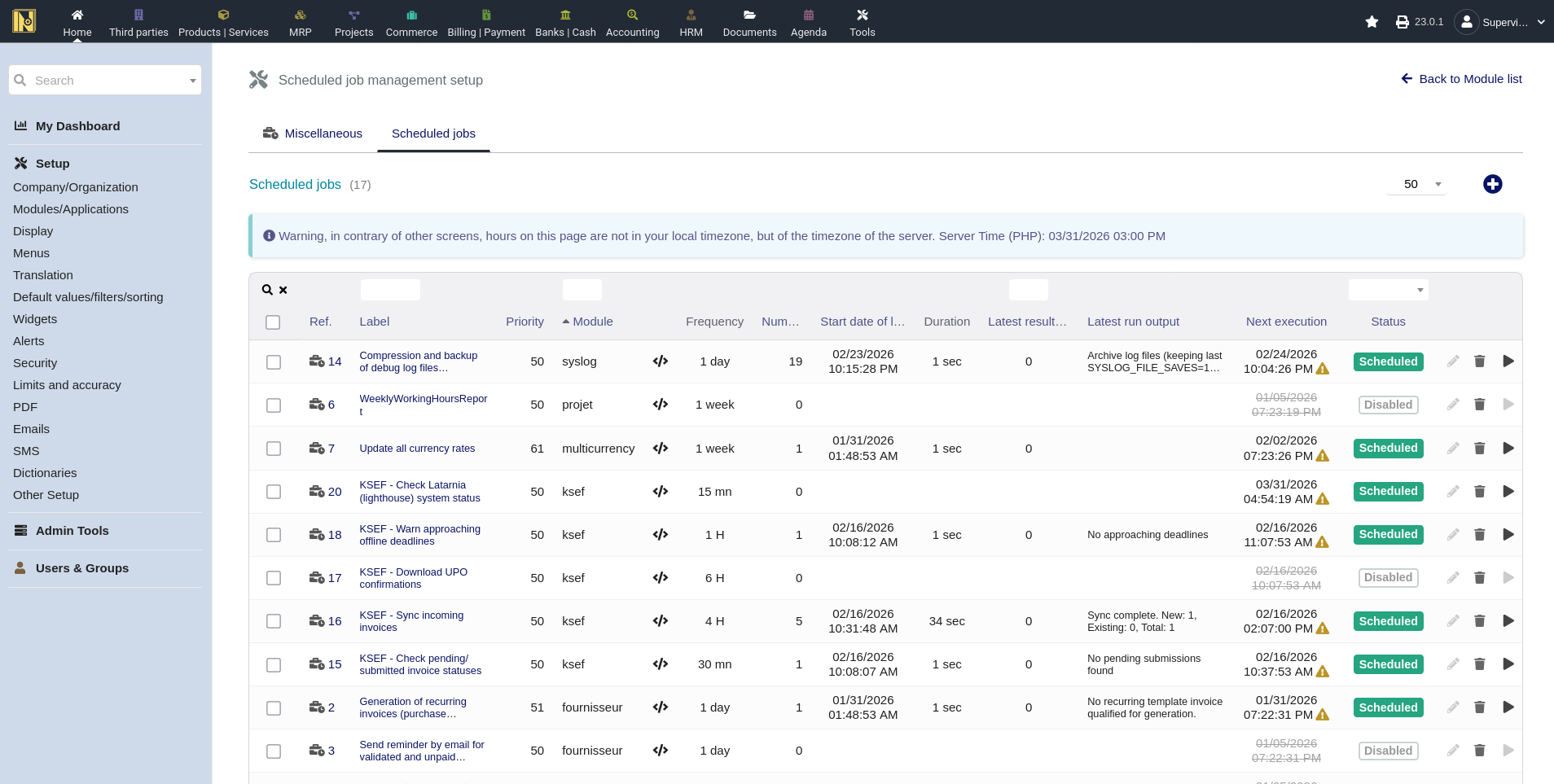
The module includes several scheduled jobs that automate routine KSeF tasks. These use Dolibarr's built-in cron system (Home -> Setup -> Modules -> Scheduled Jobs). After enabling the KSeF module, the jobs are registered automatically. You can configure their frequency, enable or disable them individually, and monitor execution from the Scheduled Jobs page.
Check Submission Status - polls KSeF for the status of invoices still in "Pending", "Submitted", or "Timeout" state. If you submit invoices and close the browser before confirmation arrives, this job picks up the results later. It also handles retrying offline invoices - when it encounters an offline invoice waiting for online submission, it automatically attempts to submit it. Without this job, you'd need to manually check statuses and submit each offline invoice by hand. Default frequency: every 30 minutes. Enabled by default.
Sync Incoming Invoices - downloads new incoming invoices from KSeF, same as clicking "Synchronize with KSeF" on the incoming invoices page. Default frequency: every 4 hours. Disabled by default - enable it once you've verified your incoming sync works correctly.
Download Outstanding Confirmations (UPO) - fetches UPO documents for submitted invoices that don't have one yet. Sometimes the UPO isn't available immediately after submission, so this job catches up later. Processes up to 50 invoices per run. Default frequency: every 6 hours. Disabled by default.
Warn of Offline Deadlines - checks for offline invoices with deadlines approaching within the next 24 hours and logs warnings. Offline invoices must be submitted to KSeF within a certain timeframe after the outage ends - this job makes sure you don't miss that deadline. Default frequency: every hour. Enabled by default.
Check Latarnia (Lighthouse) System Status - polls the Ministry of Finance's Latarnia ("Lighthouse") availability API and caches the current KSeF system status (Available, Maintenance, Failure, or Total Failure) along with any official messages. This is what powers the system-status banner you see on the index and submission pages, so you know about outages or planned maintenance before you try to send. Default frequency: every 15 minutes. Enabled by default.
One bit of automation runs outside the cron system: when an invoice is created, the module automatically fills in the Date of Sale (from the linked shipment, sales order delivery date, sales order date, or finally the invoice date - configurable, and always editable per invoice). For correction invoices, it also pre-fills the default correction reason and type if you've set defaults in the configuration. This happens quietly on invoice creation so the FA(3) XML carries the right values without manual entry.
Setting up cron jobs - Dolibarr's scheduled job system requires a system-level cron trigger to work. If you haven't set this up before:
1. Go to Home → Setup → Modules and enable the "Scheduled Jobs" module if it isn't already
2. Follow Dolibarr's instructions for adding a system crontab entry that calls Dolibarr's cron runner - typically a single line in your server's crontab that runs every 5 minutes
3. Once the system cron is running, you can manage individual job schedules from within Dolibarr
If scheduled jobs are already working for other Dolibarr modules, the KSeF jobs work automatically - no additional system configuration needed.
Status Page
The module adds a Status page accessible from the KSeF menu. This is your operational hub for managing KSeF submissions - a full submission management page, not just a summary dashboard.
The page lists all submissions (showing the latest attempt per invoice) with searchable and sortable columns: invoice reference, KSeF number, status, environment, submission date, customer, amount, and attempt count. You can filter by invoice reference, KSeF number, status (Pending/Accepted/Failed/Rejected/Offline/Timeout), environment (Test/Demo/Production), and date range.
Each row has action buttons to check the current status on KSeF, retry a failed submission, download the submitted XML or UPO, or view detailed error information in a modal overlay. The error detail modal shows the error code, a human-readable description, the raw error message, and technical details from the API response.
Above the submission list, a common errors summary aggregates the most frequent error codes from the last 30 days. If the same error appears across multiple invoices, it's usually a configuration issue rather than something wrong with individual invoices. The page supports mass actions and links each submission to its invoice and customer for easy navigation.
This is the first place to check if something seems wrong - it gives you the big picture without opening individual invoices, and you can take action directly from the list.
REST API
The module adds REST API endpoints to Dolibarr's existing API infrastructure, allowing external applications to interact with KSeF functionality programmatically. Useful for custom automation, external systems that need to trigger submissions, or building monitoring and reporting tools.
The endpoints follow Dolibarr's standard REST API patterns and authentication. If you're already using Dolibarr's API, the KSeF endpoints work the same way. They cover outgoing submissions (submitting, retrying, checking status, downloading XML/UPO), incoming invoices (syncing, importing, viewing details), and system health checks.
The source code is the best reference for available endpoints and their parameters - check the module's API class files for the full list.
Note: Due to a known Dolibarr issue (#32491), the module includes a minor workaround for API endpoint registration. This is transparent to API consumers - just be aware of it if you're troubleshooting API routing issues.
Module Index Page
The module's index page (accessible from the top-level KSeF menu entry) gives you an operational overview at a glance:
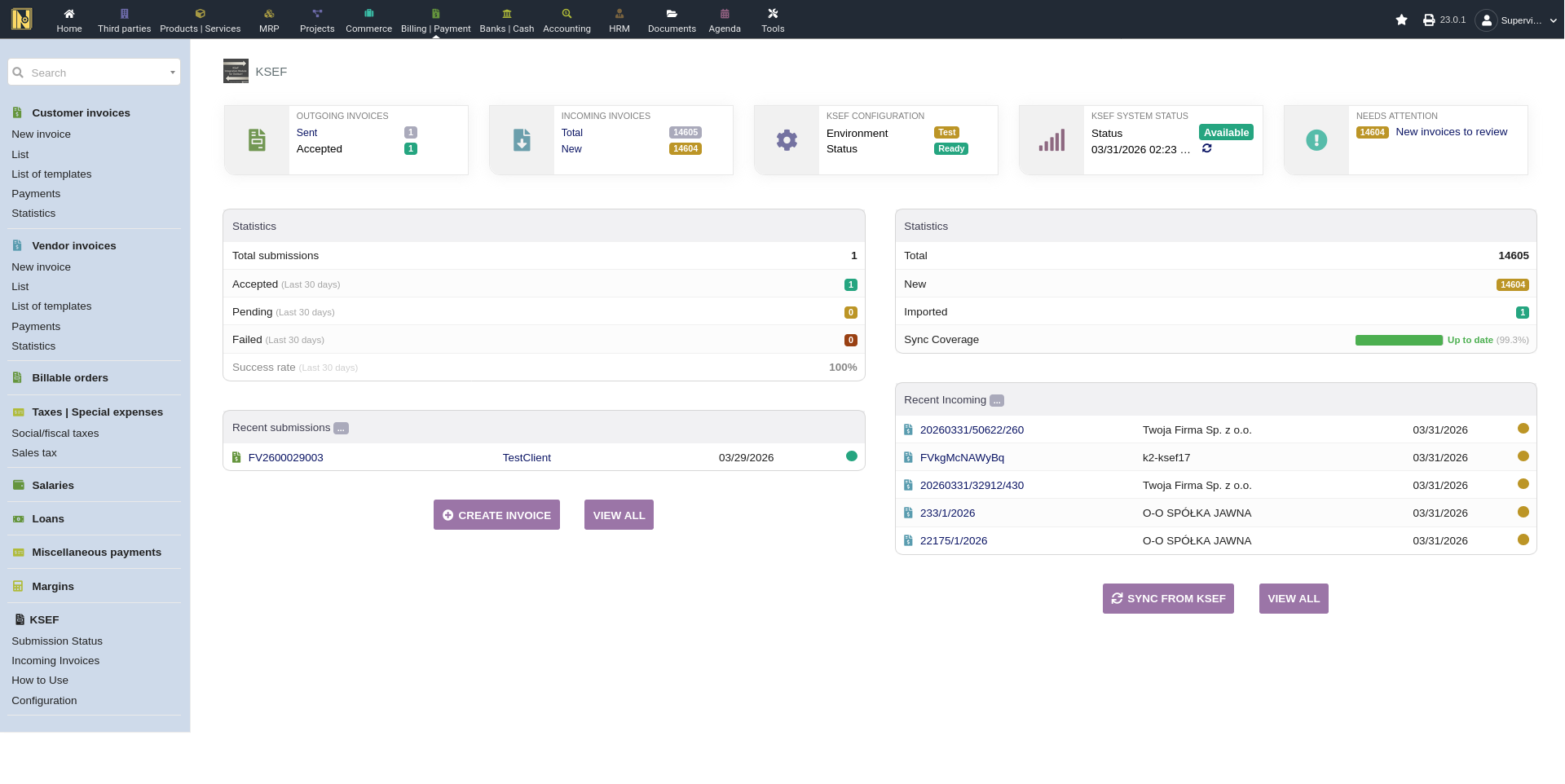
Info boxes at the top show three summary cards: Outgoing invoices (total sent and accepted count for the last 30 days), Incoming invoices (total count and new invoices awaiting review), and Configuration (current environment and readiness status). If your authentication certificate is approaching expiry (within 30 days), a warning banner appears below the info boxes. The page also shows the current KSeF system status - if KSeF is experiencing an outage or planned maintenance, a banner appears here and on submission pages so you know before you try to send.
"Needs Attention" alerts highlight items requiring action - offline invoices with approaching deadlines, failed/rejected submissions that can be retried, submissions still awaiting confirmation, new incoming invoices to review, and import errors. Each alert links directly to a filtered view so you can address it immediately.
Statistics show total submissions all-time, plus accepted, pending, and failed counts for the last 30 days, along with the success rate percentage.
Recent activity tables show the latest outgoing submissions and recent incoming invoices, with links to the relevant invoice and customer records. Sync coverage timeline and quick action buttons (Create Invoice, View All, Synchronize) round out the page.
A good page to check first thing in the morning - it tells you at a glance if everything is healthy and surfaces anything that needs attention.
KSeF Menu Structure
The module adds a KSeF section under Dolibarr's Billing menu:
KSeF - the index/overview page described above
Submission Status - the full submission management page
Incoming Invoices - the incoming invoices list with sync and import
How To Use - built-in quick reference guide with test connection buttons
Configuration - module settings (admin users only)
Files, Migrations, and Other Details
Attached files - The module generates and attaches several file types to invoices throughout their lifecycle. For outgoing invoices: FA(3) XML, UPO (downloaded after acceptance), and a KSeF-style PDF (generated automatically after submission or offline creation). For incoming invoices: a KSeF-style PDF (attached at import) and the original XML (downloadable from the incoming invoice card). These files are stored in Dolibarr's standard document system and appear in the "Attached Files" section of the relevant invoice.
Migration system - The module includes an internal migration system that runs automatically when you update (after the required disable/re-enable). Migrations handle re-parsing incoming invoice XML when the parser is improved, updating database structures for new features, and fixing data from earlier versions. You don't need to do anything manually - migrations run on module activation and are tracked so they don't repeat. If a migration fails, the error is logged in Dolibarr's logs.
CSRF protection - The module respects Dolibarr's MAIN_SECURITY_CSRF_WITH_TOKEN setting. When enabled (the default on modern Dolibarr installations), all form submissions and sensitive actions require a valid CSRF token. If you see unexpected token errors, make sure your Dolibarr session hasn't expired and that CSRF protection is consistently enabled across your installation.
Updating the Module
When a new version is released on GitHub:
1. Download the new ZIP from the releases page
2. In Dolibarr, go to Home → Setup → Modules
3. Disable the KSeF module
4. Upload the new ZIP via "Deploy/install external module" (this overwrites the old files)
5. Re-enable the KSeF module
The disable/re-enable is currently required for all updates. Your configuration is preserved through this cycle by default - tokens, certificates, settings, and all invoice data remain intact. The migration system runs on re-enable to handle any data structure changes.
If you want a completely clean start, there's a "Remove configuration data on module disable" setting that wipes everything. Make sure it's off (the default) before updating unless you intentionally want to reconfigure from scratch.